

What it does
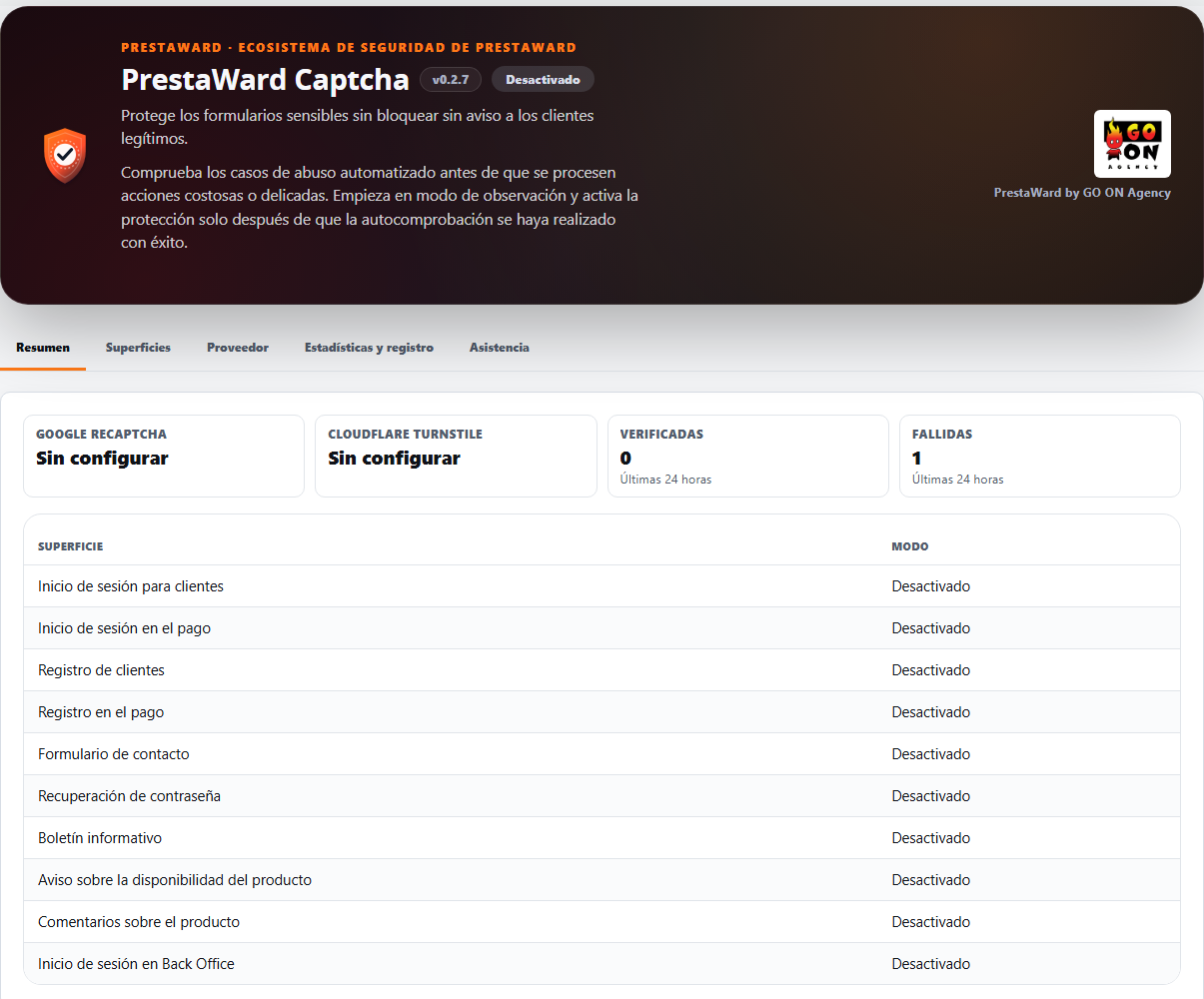
Protects login, registration, orders, contact forms, password recovery, Back Office access, newsletters, comments and availability notifications. Observation mode allows you to check how the system behaves in practice before activating any restrictions.
It protects the login and customer registration processes that take place during the purchase. It does not validate the payment or the ‘Confirm Order’ button.
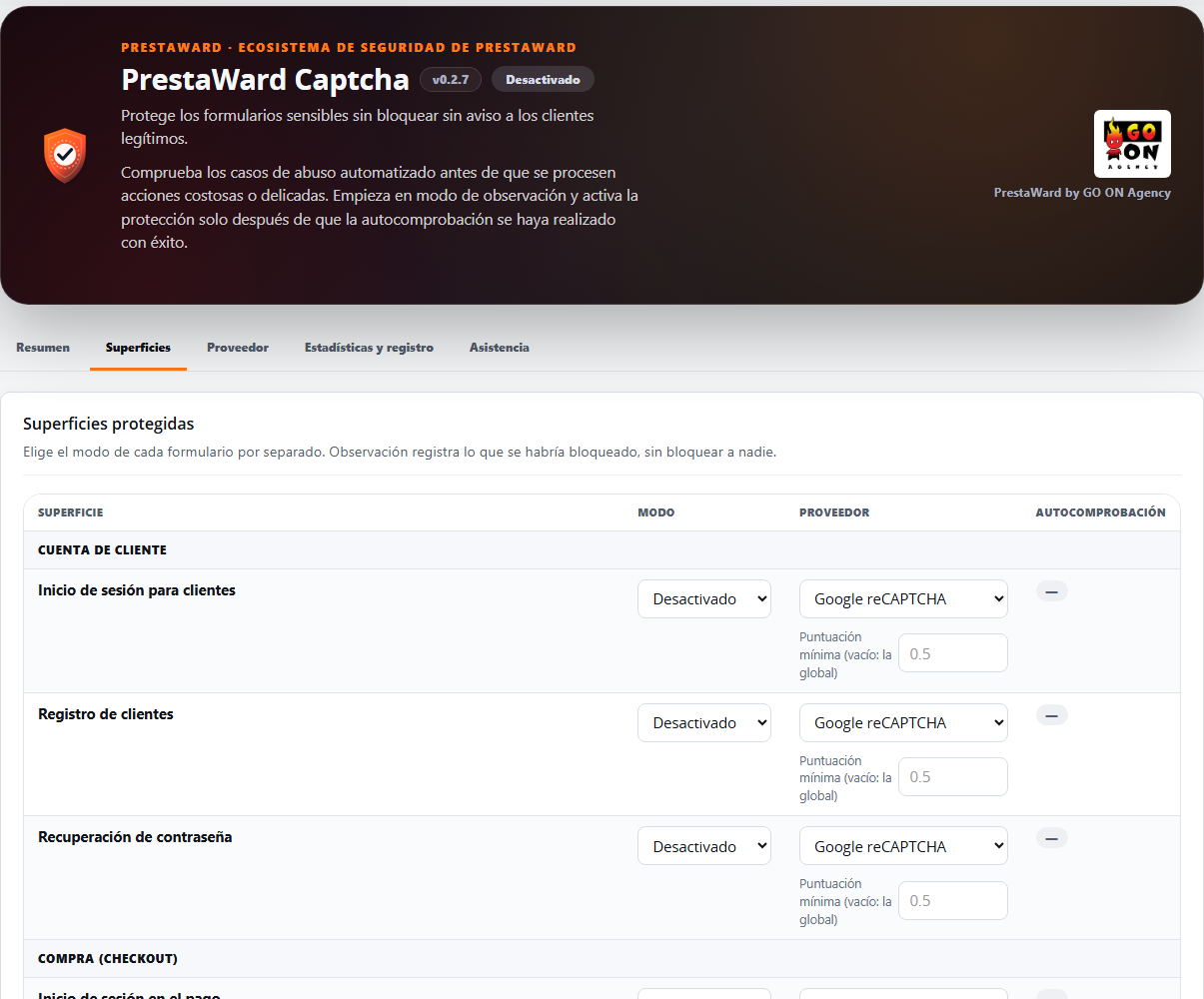
Each form has its own mode (Disabled, Observation or Protection), so you can protect access to the Back Office and only observe the contact form at the same time.
It covers ten standard forms (login and registration, including during the checkout process; contact; password recovery; Back Office access; newsletters; product reviews and availability notifications) and adds your theme’s own forms using a CSS selector, without editing templates. If Google or Cloudflare stop responding, neither your customers nor your team will be locked out: whilst the outage lasts, the module applies local checks verified on the server.
How it works
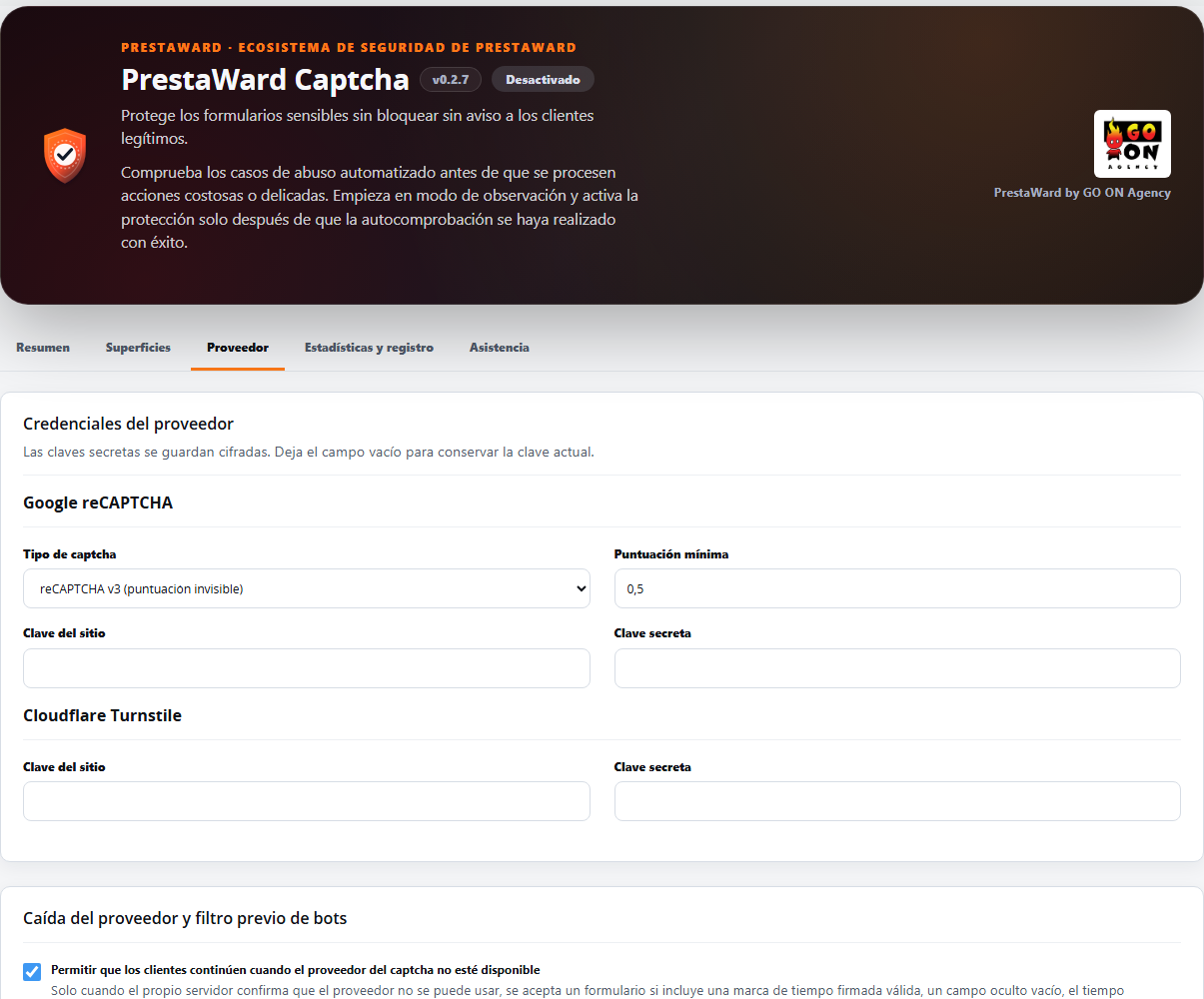
- The module does not include its own CAPTCHA: it uses Google reCAPTCHA (v2 or v3) or Cloudflare Turnstile. You can choose the provider for each surface and for each shop.
- It detects compatible forms in the browser, so you don’t have to edit templates. The final check is carried out on the server: it validates the domain, the action, the expiry date and ensures the token has not been used before.
- It is installed with all forms in Disabled mode. Each form has its own mode in each shop: in Observation it records what would have happened without blocking anyone, and in Protection it blocks submissions without a valid verification. A form can only switch to Protection after passing the self-test in Observation.
- Settings are saved per shop. To download the support report, you must select a specific shop.
- If the server fails to contact Google or Cloudflare several times in a row, the module flags the shop as degraded and notifies you by email.
- Backup in the event of a provider outage (customer forms and access to the Back Office in Protection mode): only when the server itself confirms that the provider cannot be used will a submission be accepted that includes a timestamp signed by the page, an empty trap field, a few seconds having elapsed since the page loaded, and a normal submission rate. Each use is recorded as ‘fallback used’ in the statistics. This is enabled by default and can be disabled via a single toggle per shop. When accessing the Back Office, it requires the same signals verified on the server and is never a way to bypass a provider that is actually responding: a rejected token, or a submission without a token whilst the provider is functioning, is rejected as usual. During an outage, this access method is less secure than a targeted bot, so it is advisable to maintain a second factor using PrestaWard Authenticator.
- Local form mode (newsletter, contact and availability notifications): the form is secured solely by local checks, including a signed timestamp, a trap field, a minimum submission time (4 seconds) and its own submission limit (1 to 50 every 10 minutes). It does not load any scripts from a provider, does not call any, and does not require keys. It retains its own mode (Disabled, Observation or Protection) and only switches to Protection after passing the self-test in Observation mode. It is less effective against targeted bots than a third-party provider; for this reason, the control panel indicates this and the form is not available for login, registration, ordering, password recovery, the Back Office or product reviews. A page served from a full cache for more than six hours may reject submissions: refreshing the page resolves this.
- Blocked email domains (customer registration, including during checkout, and newsletters): a list that you compile yourself, one rule per line, containing either an exact domain or a wildcard for its subdomains (up to 100 rules). The email domain is checked against the list before querying the provider and, if it matches, the email is rejected with a neutral message that does not reveal the list. Only rejections are logged in the ‘Observation’ log. Neither the visitor’s email address nor their domain is stored or logged: just a counter and an event without personal data for each rejection.
- Minimum reCAPTCHA v3 score per form: each form can have its own score, from 0 to 1. If you leave this blank, the global score is used, so nothing changes until you set a value. A form in ‘Protection’ mode with its own score must have this score adjusted in ‘Observation’ mode and the self-test repeated before returning to ‘Protection’ mode.
- Widget appearance (Interfaces tab): theme (light, dark or automatic) and size (normal or compact) for the reCAPTCHA v2 box and for Cloudflare Turnstile, including when accessing the Back Office. The default settings retain the current appearance.
- Server-side pre-filter (Protection mode): obvious bots are rejected before the provider is contacted, based solely on positive indicators: a filled-in trap field, a forged timestamp, a submission speed faster than a person could type, or an excessive number of submissions per form and visitor. A missing or expired timestamp is never accepted as evidence. This can be disabled per shop.
- The new checks do not store any information that identifies the visitor: this is grouped into an anonymous bucket, created using a hash with a key that changes daily, which exists only in a counter table that is purged after two days.
- Protection against integration failures (customer forms in Protection): if a form stops sending the token to the server whilst the provider is operational (for example, following a theme update, custom JavaScript or page caching), that form switches on its own to a temporary Observation to avoid rejecting customers, and you receive an incident in the module and an email. It returns to Protection by itself once the problem disappears and tokens are verified correctly. Access to the Back Office is never affected.
- Email alerts notify you of operational incidents and spikes in automated traffic. Recipients and thresholds are configured per shop.
Key features
- Custom mode for each form and shop: Disabled, Observation or Protection.
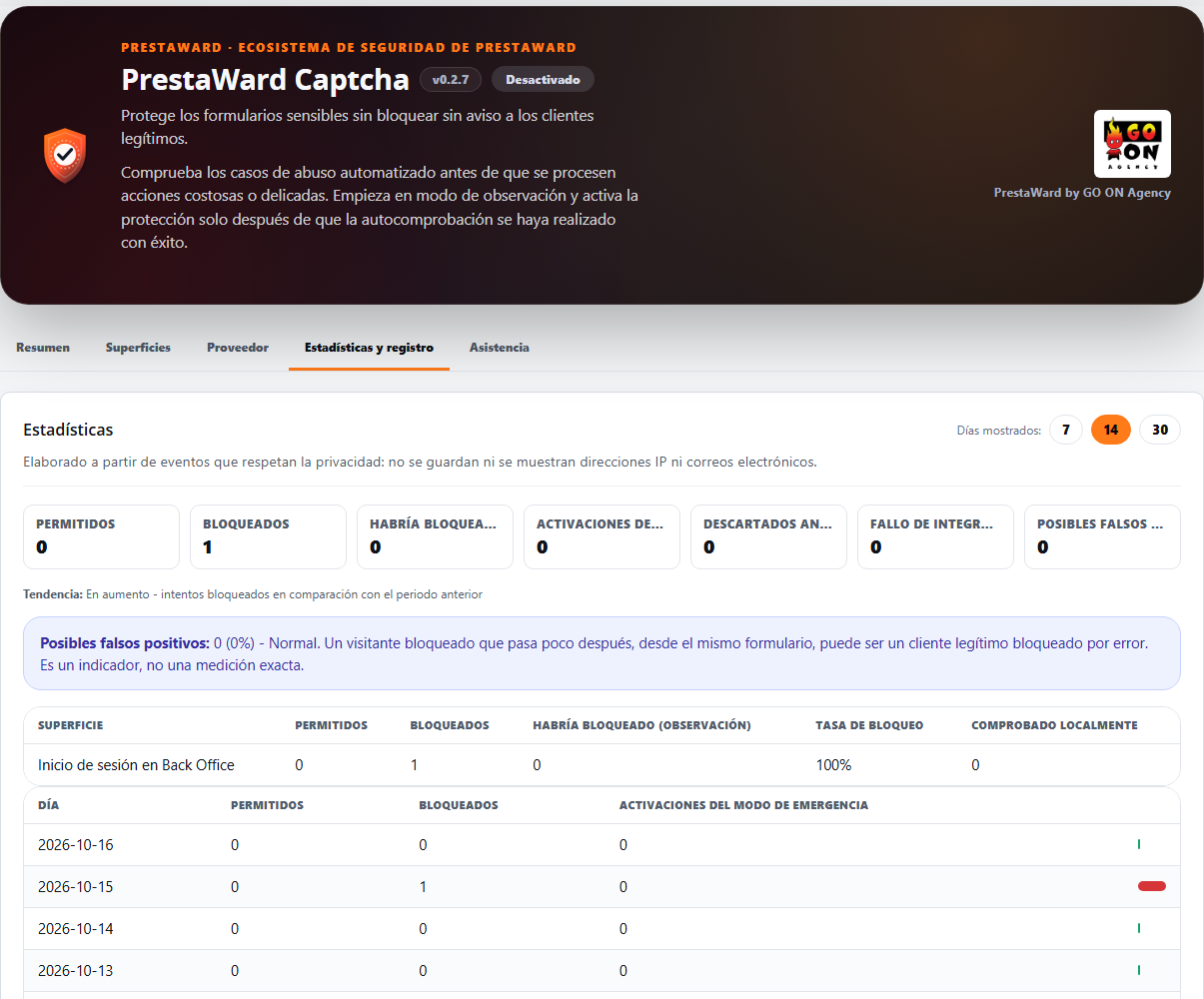
- Statistics panel: permitted and blocked submissions by form and day (7, 14 or 30 days), trend compared to the previous period, use of the backup, requests rejected before reaching the provider, how many submissions from each form were checked locally, and an indicator of possible false positives. In the ‘Observation’ section, a separate column shows how many submissions would have been blocked. It does not contain addresses or email addresses.
- Custom forms: a form that is not automatically recognised (one-page checkout, theme forms) can be assigned, per shop, to a protected surface using a CSS selector (up to ten, optionally limited to a single page). The dashboard warns that Protection is only maintained if the form submits its data to a page verified by the module.
- Google reCAPTCHA v2/v3, and Cloudflare Turnstile, selectable by surface and shop, with a minimum reCAPTCHA v3 score per form.
- Ten standard forms and custom forms without edited templates.
- Local mode via form, without keys or third-party scripts, for newsletters, contact forms and availability notifications.
- Our own list of blocked email domains for customer registration and the newsletter, applied before consulting the provider and without storing any emails or domains.
- Local backup in the event of a provider outage, including access to the Back Office, which continues to reject everything that the provider has rejected.
- Theme and size of the reCAPTCHA v2 and Cloudflare Turnstile widgets.
- ‘Surfaces’ tab sorted: grouped forms table, mode selector showing its full text and the ‘Save’ button in its place, without overlapping the temporary pause card.
- Support emails featuring your shop’s logo in the header and, in the footer, the GO ON Agency logo with the signature ‘PrestaWard by GO ON Agency’. The body displays the form, the reason and the status with translated text, not internal codes.
- Unified design of the dashboard across the four PrestaWard modules: section headers, form cards with neutral borders and standard collapsible blocks, statistics displayed on a single line, and a larger GO ON Agency logo in the header. The main button is now a solid brand colour, without a gradient.
- Tabbed panel (Overview, Surfaces, Supplier, and Statistics & Logs, plus a Support tab, always the last one): only the currently open tab is taken into account; the Overview tab displays the status at a glance with, at most, one alert line; and each tab retains only its own settings.
- Domain validation, action, expiry and token reuse.
- Compatibility with the classic and Symfony workflows in the Back Office.
- Technical logs without email addresses, IP addresses, cookies or tokens.
- Configurable log retention per shop: 30 days by default, and between 1 and 365 days. The module deletes expired logs every day.
- Vendor credentials encrypted at rest.
- Integrity API and heartbeat integrated. On the module screen, the ‘Synchronise’ button updates the connection with Integrity.
- Synchronisation with Integrity upon opening the dashboard, via a background request that does not slow down the page, and no more than once per minute per shop.
- GO ON Agency support panel with a downloadable diagnostic report. It is downloaded by an employee with editing permissions, having selected a shop. It includes versions, statuses and counters; it does not contain customer data and is not sent automatically.
- Control panel and translations in nine languages.
Requirements
- PrestaShop versions 1.7.7 to 9, with the version of PHP required by your version of PrestaShop.
- Google reCAPTCHA or Cloudflare Turnstile keys for each shop where you enable Protection. These are created by the merchant themselves in the provider’s account. Forms in local mode do not require keys.
- In Protection mode, the visitor’s browser must be able to load the provider’s script. If it fails to load, the form will not be submitted and the visitor will be asked to try again, unless the server confirms that the provider is unavailable and the local fallback is applied, or the form uses local mode.
What it does not do
- It is not a self-hosted CAPTCHA: verification is carried out by Google or Cloudflare, subject to their own privacy policies. The server sends them the token and the visitor’s IP address for verification purposes.
- It does not block anything in Disabled mode or in Observation mode.
- Local mode is no substitute for a provider: it is less effective against targeted bots; it is only available for newsletters, contact forms and availability notifications; and in these forms, the provider’s fallback system, integration monitoring and fail-safe measures do not apply because there is no provider that could fail.
- It does not include lists of email domains or third-party addresses: you are responsible for compiling and maintaining the list of blocked domains yourself; it does not update automatically.
- It does not protect payments, other forms not included in the list (except those you assign using a CSS selector) or the PrestaShop administration API.
- It is not a substitute for a web application firewall (WAF).
- The footer of the module’s emails does not contain any links, contact details or images hosted outside your shop: the GO ON Agency logo is a file from the module itself that is served from your shop.
- It does not store tokens, secrets, passwords, cookies, email addresses or IP addresses in its logs.
Compatibility verified
Version 0.2.7 passed laboratory tests on PrestaShop 1.7, 8 and 9 on 15 October 2026, including the final build: clean installation and update from version 0.2.6, and access to the Back Office via a real browser on all three versions (provider rejection, script blocked and simulated provider outage). In PrestaShop 9, a rejected CAPTCHA displays the CAPTCHA message followed by the generic warning that PrestaShop always adds.
Previous versions were tested on PrestaShop 1.7.8.11 with PHP 7.4, PrestaShop 8.2.7 with PHP 8.1 and PrestaShop 9.1.4 with PHP 8.5. Validation includes Front Office forms, Back Office login and the full availability notification workflow with ps_emailalerts.
Secure use
Installation does not enable any blocking. Configure the provider’s keys, check the forms in Observation and move to Protection only when the diagnostics are correct.
Changelog
This changelog summarises, version by version, the impact on shops and e-commerce teams.
0.2.7
- New: local mode per form. The newsletter, contact form and availability notifications can be protected using local checks alone (signed timestamp, trap field, minimum submission time of 4 seconds and submission limit), without loading any third-party scripts or requiring keys. Each form retains its mode (Disabled, Observation or Protection) and only switches to Protection after passing the self-test in Observation mode. It is less secure against targeted bots than a provider and is never offered for access, registration, orders, password recovery, Back Office or comments. The statistics show how many submissions from each form were checked locally. A page served from a full cache for more than six hours may reject the submission; reloading the page resolves this.
- New: blocked email domains. A list that you create (one rule per line, either an exact domain or a wildcard for its subdomains, up to 100 rules) is applied to customer registration, including during the checkout process, and to the newsletter. A check is carried out before querying the provider, and any matching email is rejected with a neutral message that does not reveal the list. In ‘Observation’ mode, only what would have been rejected is logged. Neither the email nor its domain is stored: only a counter and an event containing no personal data for each rejection.
- New: minimum reCAPTCHA v3 score per form. If you leave this blank, the global score is used, so nothing changes until you set a value. An invalid value reverts to the global score.
- New: theme (light, dark or automatic) and size (normal or compact) for the reCAPTCHA v2 and Cloudflare Turnstile widgets, including when accessing the Back Office. The default settings retain the current appearance; reCAPTCHA v3 and invisible reCAPTCHA v2 do not display a widget. In reCAPTCHA, ‘automatic’ follows the visitor’s colour scheme.
- Access to the Back Office uses the same local fallback as customer forms, but only whilst the provider is unavailable and the server confirms this. A provider that has responded with ‘verification failed’ is still rejected as usual. Each instance of use is logged as ‘fallback used’; a switch per shop disables it, and the operator’s temporary pause remains in place. The login screen never becomes locked: the script reports the failure to the server and then submits the form regardless. During an outage, this login method is more vulnerable to a targeted bot; it is advisable to maintain PrestaWard Authenticator as a second line of defence. The integration failure safeguard still does not affect the Back Office.
- The dashboard is divided into tabs (Summary, Surfaces, Provider, and Statistics and Log) and only calculates data for the currently open tab. The Summary tab displays the status of each supplier, successful and failed checks from the last 24 hours, the active status of each form and, at most, one alert line linking to the tab where the issue is resolved. Each tab has its own Save button and saves only the settings it displays. The GO ON Agency support panel has its own tab, ‘Support’, which is always the last one, and the Integrity status appears at the very end of all the tabs.
- The ‘Interfaces’ tab has been redesigned: the forms table is now grouped; the selector no longer cuts off its text (it previously displayed ‘Desa’); and the ‘Save’ button is positioned outside the temporary pause card, without overlapping it. The theme and size of the widget can be adjusted in a section of this tab.
- Corrects the warning ‘forms activated without passing their test’: this used to appear even when all six forms were disabled. It now only counts forms that are not in ‘Disabled’ mode.
- In new installations, email alerts for incidents are disabled until you specify an email address, so the settings can be saved straight away. Installations that are updated retain their settings.
- Support emails (both new and reopened) display your shop’s logo in the header (with the shop name as alternative text) and a standard footer featuring the GO ON Agency logo and the signature ‘PrestaWard by GO ON Agency’, without any links or contact details. The footer logo is a file from the module itself, served from your shop.
- Fixes an issue where the body of the ticket email displayed internal codes (for example, ‘configuration_test’ or ‘opened’): it now indicates the form, the cause and the status with text translated into all nine languages.
- Fixes an issue where a failed call to the provider would cause a Front Office form to become unresponsive; calls to the provider from the shop script are now protected in the same way as those for accessing the Back Office.
- Unified design of the dashboard across the four PrestaWard modules: section headers, form cards with neutral borders and standard collapsible blocks, statistics displayed on a single line, and a larger GO ON Agency logo in the header. The main button is now a solid brand colour, without a gradient.
- Fixes an issue where, in PrestaShop 9, the admin theme displayed tabs with underlines as links and section titles in capital letters. The common styles override this only within the PrestaWard panel, so PrestaShop 1.7 and 8 look the same as before.
- Fixes an issue where, in PrestaShop 1.7, the module’s stylesheet was ignored when registered with the version number in the URL. The file is now checked and registered without parameters, so that the new styling appears in versions 1.7, 8 and 9.
- Fixes an issue where, in PrestaShop 9, synchronisation with Integrity would check the security token using a method that PrestaShop 9 does not use, which could result in it being rejected. It is now validated using the PrestaShop 9 service; in PrestaShop 1.7 and 8, the check remains the same.
- When the connection to Integrity cannot be updated at that moment, the panel displays a single message: the saved connection remains valid and will be retried automatically. The labels on all tabs have been translated into all nine languages.
- Local mode has its own submission limit (from 1 to 50 every 10 minutes). The update copies the current limit from the backup, so nothing changes after updating, and modifying one of the two limits no longer affects the other.
- Fixes an issue where, in PrestaShop 9, a rejected CAPTCHA (for example, due to an invalid site key in ‘Protection’) would only display PrestaShop’s generic message regarding the employee username or password. The module now displays its own message in all versions; PrestaShop 9 continues to append its generic line afterwards.
- Fixes an issue where the connection with Integrity would degrade in the ‘all shops’ context of the Back Office or when a shop other than the first one served the registration test. The installation ID is now read as a single unit from the global scope (or from the shop where it is stored) in any context; the update passes an ID stored in a shop to the global scope without regenerating it, and if it cannot be read, Integrity’s status is left as it was.
- The product header once again displays the GO ON Agency logo and the tagline ‘PrestaWard by GO ON Agency’, without any links.
- As long as you use a provider, your token is still required in exactly the same way as before. The detected surfaces, saved settings and the contract with the Integrity API remain unchanged, and the new ways of rejecting or verifying a form (local mode and blocked domains) are disabled by default. The update does not modify any tables: it simply adds new settings with values that preserve the current behaviour.
0.2.6
- Each form has its own mode in each shop (Disabled, Observation or Protection), rather than a single shop-wide mode plus toggles. This lets you protect access to the Back Office and only observe the contact form. A form only switches to Protection after passing the self-test in Observation, and the update preserves the current behaviour of each shop.
- Protection against provider downtime (customer forms in Protection mode): if the server confirms that reCAPTCHA or Turnstile cannot be used, the form is accepted only if it includes a signed timestamp, an empty invisible trap field, a few seconds having elapsed since the page loaded, and a normal submission rate. Every use is recorded in the statistics. This feature is enabled by default, can be disabled per shop, and the Back Office never uses it.
- Change to note: with this Protection enabled, an open circuit breaker no longer allows all shipments through, but instead applies these same local checks. Disable it to retain the previous behaviour.
- Server-side pre-filter (Protection mode): blocks obvious bots before contacting the provider, based solely on positive tests (trap field filled in, falsified timestamp, submissions faster than a human could type, or more than 30 submissions per form and visitor every 10 minutes). This can be disabled per shop.
- The new checks do not store any identifiable data: visitors are grouped into an anonymous pool with a key that changes every day, recorded only in a counter that is cleared after two days.
- New statistics panel: permitted and blocked submissions by form and day (7, 14 or 30 days), trend compared to the previous period, activations of Protection against provider downtime, requests rejected before reaching the provider, an indicator of possible false positives and, under Observation, the submissions that would have been blocked. It does not contain addresses or emails.
- Custom forms: a form that is not automatically recognised (one-page checkout, theme forms) can be assigned per shop to a protected surface using a CSS selector (up to ten). The dashboard warns that Protection is only effective if the form submits its data to a page that the module verifies.
- Integration Failure Guard (customer forms in Protection mode): if a form stops submitting the token to the server whilst the provider is operational (due to a theme update, custom JavaScript or the page cache), that form is automatically placed in a temporary Observation status and you receive a support ticket and an email. It returns to Protection after 15 minutes without the issue and three verified tokens. Access to the Back Office is never affected and obvious bots continue to be rejected.
- The update creates a small counter table and new settings with safe values, whilst retaining existing settings and events.
- The support and diagnostics panel is positioned just before the Integrity section, as in all other PrestaWard modules, and in the ‘all shops’ context it no longer disappears: it indicates that a shop must be selected.
- Synchronise with Integrity every time you open the dashboard, using a background request that never slows down the page, and no more than once per minute per shop.
0.2.5
- Fixes the Back Office login service in PrestaShop 1.7. In PrestaShop 9, the fix is limited to the Back Office login form and does not affect the administration API.
- Stops retrying registration with Integrity when the shop’s registration key changes, and displays a clear warning.
- Renews the signed Integrity policy before it expires and keeps the current policy if a renewal fails.
- Corrects the included policy key so that it works in PHP 7.1 and 7.2.
- Adds the GO ON Agency support panel in nine languages, with a downloadable diagnostic report that does not include customer data and is not sent automatically. It can only be downloaded by an employee with editing permissions who has selected a shop.
- The retention period for technical logs is now strictly enforced (30 days by default, configurable per shop): until now, they were stored indefinitely. Each shop deletes expired logs daily, and incidents are not affected.
- Declares compatibility from PrestaShop 1.7.7.0, the oldest version tested.
0.2.4
- Corrects the submission of the admin login via Turnstile after solving the CAPTCHA, whilst retaining the button that initiated the submission.
- Fixes the registration test in PrestaShop 9 and improves Integrity’s diagnostics and retry mechanism.
0.2.3
- Unreleased version, superseded by 0.2.4.
0.2.2
- Prevents other JavaScript handlers in the theme from initiating submission whilst the CAPTCHA is still pending.
- Eliminates endless loading states and requests made before a valid token is available.
- Displays the CAPTCHA when opening login or registration forms that were hidden when the page loaded.
0.2.1
- Restores the visible CAPTCHA before the first login attempt in the Front Office and Back Office.
- Prevents the cache from displaying an old or incorrect CAPTCHA after updating the module.
- Replaces the pop-up with an accessible, visible and mobile-friendly warning.
- It displays Back Office errors on the login screen as a single error message, without any blank pages.
0.2.0
- Adds Cloudflare Turnstile with encrypted credentials and independent selection by surface.
- Links each token to its protected action and renews the challenge on repeated submissions.
- Improves the detection of login, registration, password recovery, checkout, newsletter and notification forms.
- It incorporates a temporary, limited and audited operational pause, without weakening Integrity’s signed policy.
- Updates the dashboard, its responsive design and the translations for the nine languages.
- Enhances the fail-closed persistence of the latest verified Integrity policy.
0.1.2
- Distinguishes automated bursts from operational faults and prevents duplicate alerts.
- Automatically closes automated traffic incidents after a period of inactivity.
0.1.1
- Availability checks by surface before Protection can be activated.
- Operational status, incident history, filters, pagination and clean-up.
- Limited health telemetry and integration with Integrity’s heartbeat.
0.1.0
- First public release candidate.
- Protection set separately per surface and per shop.
- Integration with reCAPTCHA v2 and v3.
- Enrolment, signed policy and PrestaWard Integrity heartbeat.
- Checking for updates and the standard visual experience across the ecosystem.
- Multi-version compatibility and a complete catalogue in nine languages.
Licence and support
PrestaWard Captcha is distributed under the Academic Free License 3.0 (AFL-3.0). You may use, study, modify and redistribute it in accordance with its terms.
Support: hola@go-onagency.es.