
What it does
Faceted search can create very resource-intensive filter combinations. A small volume of anomalous requests can consume resources, slow down categories or render a shop inaccessible. PrestaWard Facet Shield analyses this complexity before the faceted search module processes the query.
It does not replace the search engine or alter its indexes. It acts as a bounded circuit breaker: it monitors the pattern of each request and, only when the policy is expressly enabled, rejects combinations that exceed the configured limits.
How it works
- Observe first. Record the aggregated complexity of the HTML and AJAX requests for faceted navigation.
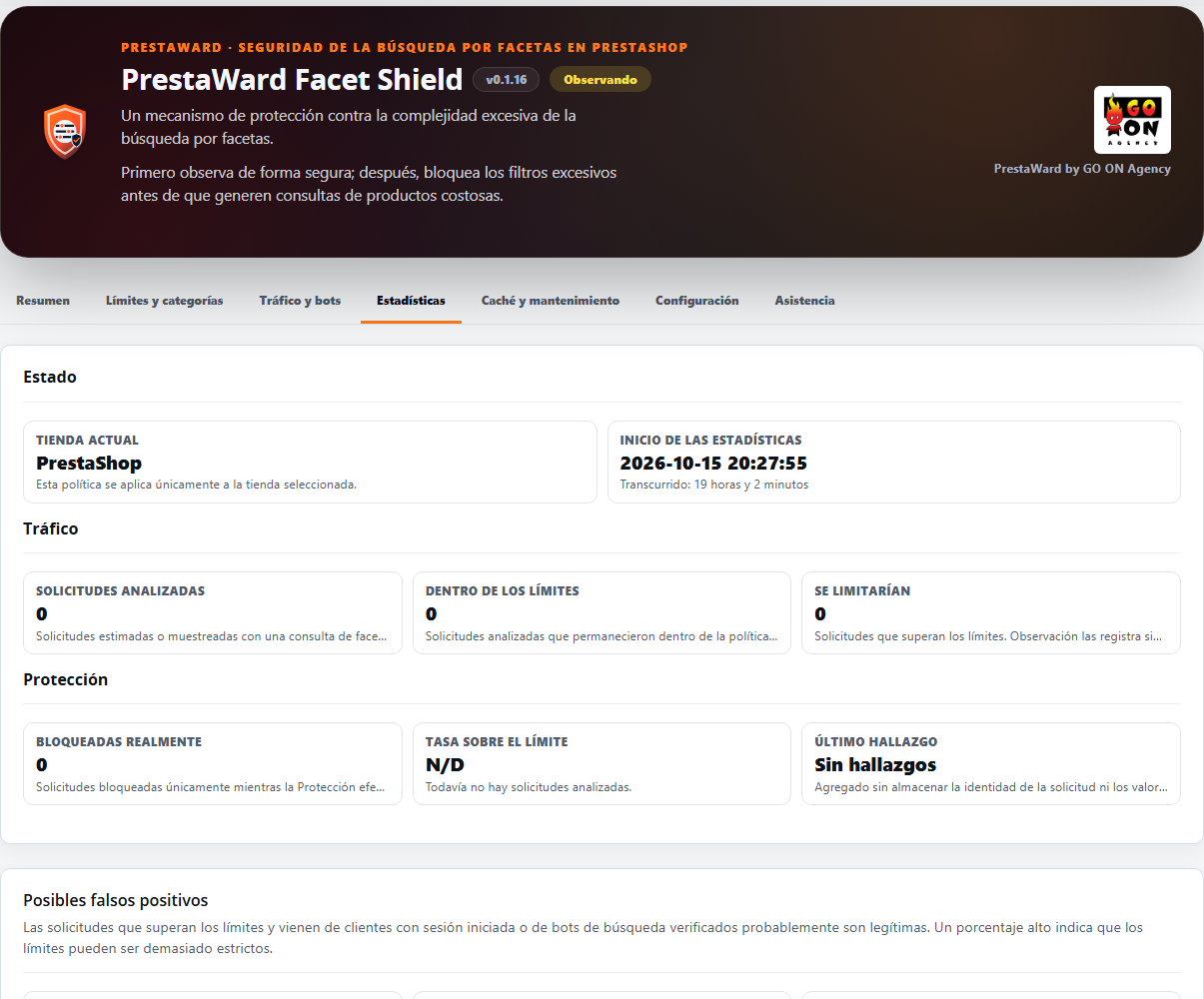
- Review the evidence. The Back Office displays analysed requests, those within limits, excesses, actual blocks, histograms and the statistical period.
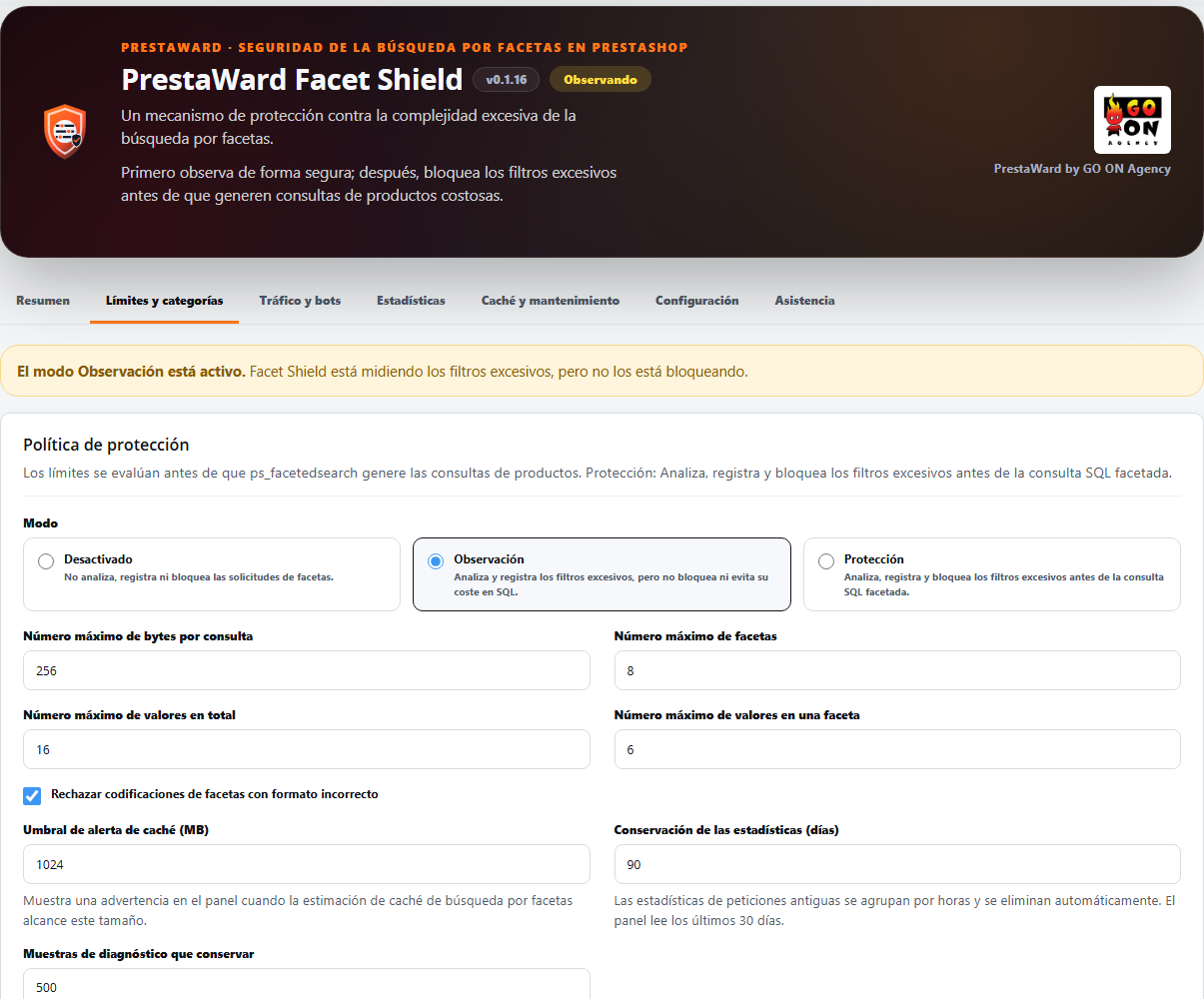
- Adjust the limits. You can control filters, facet values and malformed requests based on the actual behaviour of your catalogue, with custom limits for a single category or for all categories at a given level of the catalogue.
- Enable Protection only once it has been validated. The change requires confirmation and is managed separately per shop.
What’s included
- Secure Observation mode by default and Explicit Protection mode.
- Automatic registration with the Integrity API: no accounts or keys to set up.
- Early complexity analysis for HTML and AJAX faceted navigation requests.
- Configurable limits per shop for facets, values and request context.
- Dashboard with per-minute aggregates, a complexity histogram and translated reasons for excess.
- Suggested limits panel: based on the traffic recorded in Observation, it suggests a value for each limit, shows how many requests are blocked by the current limits and how many would be blocked by the suggestion, and explains the main cause in plain language – for example, which filter in which category is causing most of the excess. A button applies the four suggested limits to the selected shop without changing the mode.
- Robust suggestions: a suggestion is never stricter than the default limit nor does it exceed Integrity’s signed policy. If a small number of categories account for the requests that exceed a limit, the suggestion is calculated based on the remainder; it does not relax that limit, and the dashboard explains what share of the excess comes from how many categories.
- Statistics with configurable retention (90 days by default, between 30 and 365): records per minute are grouped by the hour and those that have expired are deleted in batches in the background, never whilst a page is being served to a customer.
- Bot diagnostics keeps the most recent samples (500 by default, configurable between 50 and 5,000) and discards the oldest ones rather than ceasing to log them.
- The Facet Cache panel distinguishes between cache tables and index tables, shows how the size has changed over the last few days with a warning if it is growing rapidly, and links to the native settings at
ps_facetedsearch, where you’ll find tools to rebuild indexes and clear the cache. Facet Shield only reads these tables and never modifies or deletes them. - The panel is much faster in shops with high traffic volumes: it calculates statistics, trends and suggested limits based on two readings and stores the result for ten minutes in a temporary cache file.
- Synchronisation with Integrity upon opening the dashboard, via a background request that does not slow down the page, and no more than once per minute per shop.
- Limits by category and by catalogue level: a category, or all categories at a given level, may have its own limits (query size, facets, total values and values within a facet); a blank limit uses the next level, and global limits remain the baseline. Integrity’s signed policy also limits category-specific limits.
- Suggested limits by category: the dashboard lists the categories requiring a different limit, showing the number of requests at which they would currently be blocked and the suggested limit, and allows you to apply a category with a single click. A category flagged as automated scraping is never relaxed.
- Pilot protection by category: with the shop in ‘Observation’ mode, you can ensure that only the categories you select are blocked whilst the rest remain under observation. This requires a valid, signed Integrity policy and explicit confirmation for each category; it can be stopped with a single click.
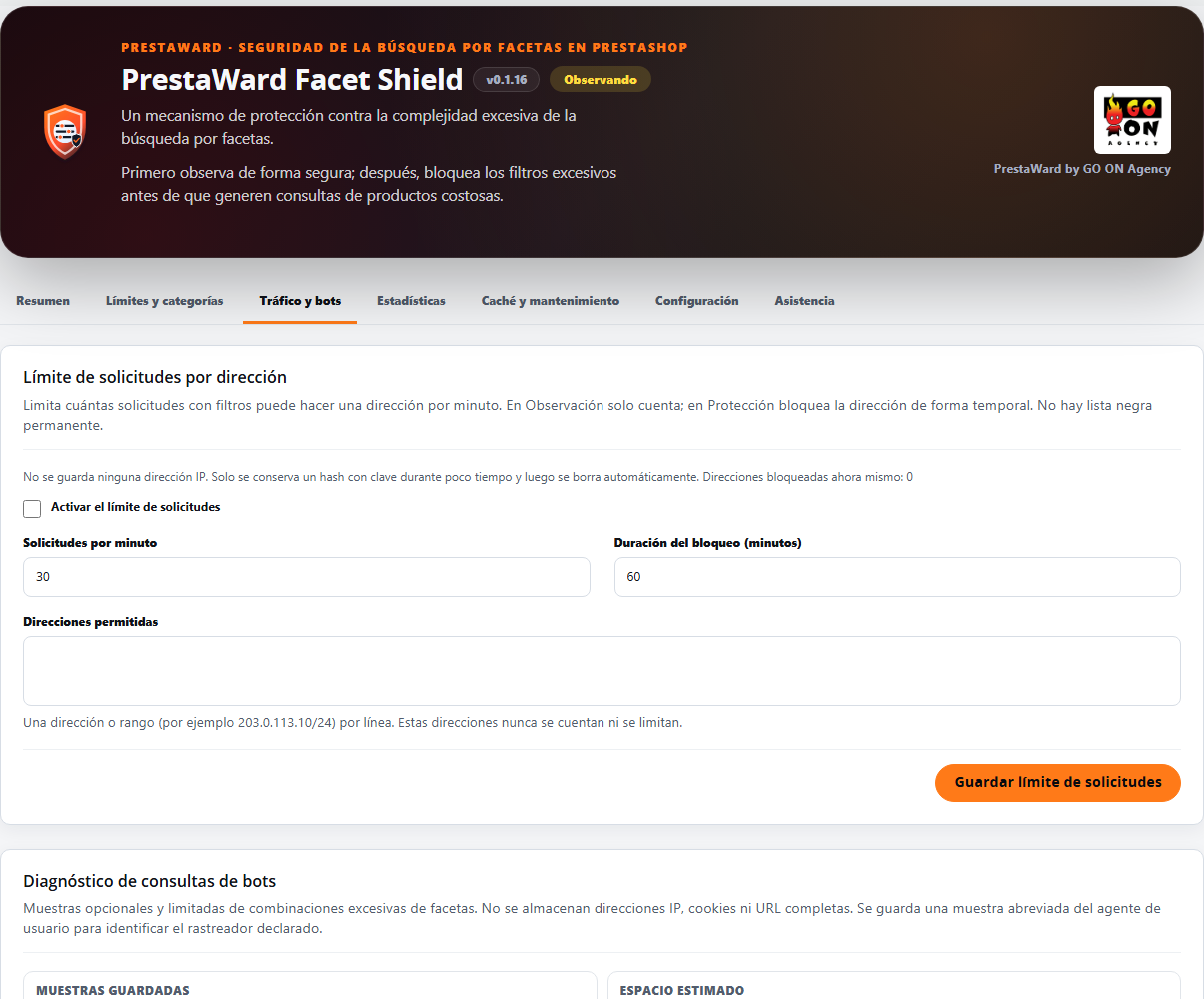
- Request limit per address (optional): counts faceted requests per minute per address (30 per minute by default, between 5 and 600). If the limit is exceeded, in ‘Protection’ mode, the address is temporarily blocked (one hour by default, up to 24) with HTTP 429 and Retry-After; in ‘Observation’ mode, it is simply counted. No IP addresses are stored; only a keyed hash is retained, which is deleted shortly after the block ends, so there is no permanent blacklist. Addresses and ranges on your allowlist are never counted, and a database failure will never block a client.
- Verified search engines: in the ‘Protection’ section, a Googlebot or Bingbot whose reverse and forward DNS records match the official servers receives a lightweight response with ‘noindex’ and the canonical URL of the category instead of a 403 error, so that the filter’s URL is removed from the index without executing faceted SQL queries. Only those claiming to be one of these search engines are queried.
- False positive indicators: requests that exceed the limits are also counted when they originate from a logged-in customer, a verified search engine or a rapid burst of ten or more per minute, and the statistics show all three figures along with their proportions.
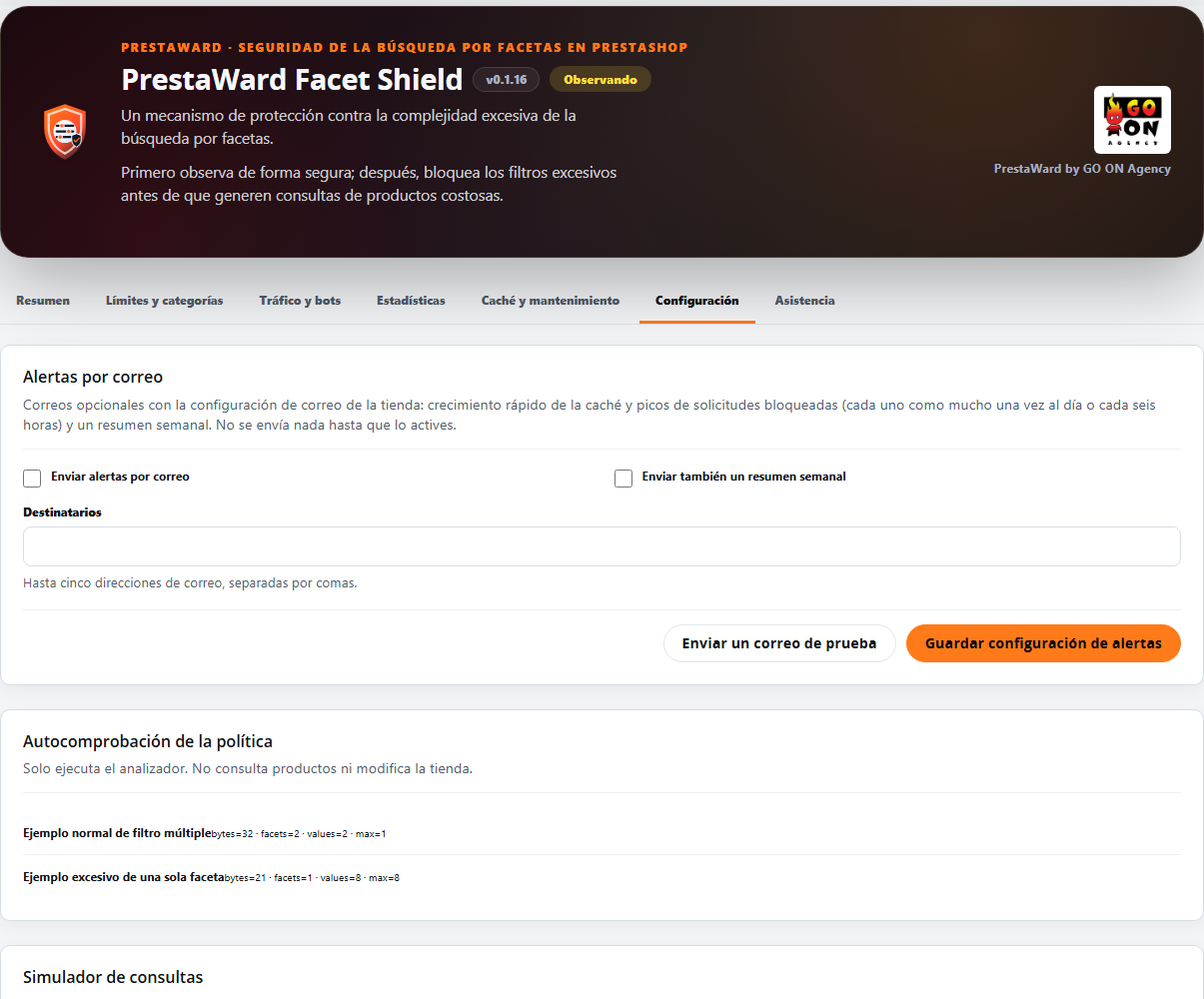
- Email alerts (optional), using the shop’s email settings: rapid cache growth (no more than once a day), peaks in blocked requests (at most every six hours) and a weekly summary, for up to five recipients of your choice, with a test email button. No PDFs or links in the text, and emails are sent from the background maintenance process, never whilst serving a page to a customer.
- Automatic cache flushing (optional): when the faceted search cache exceeds the size you choose, Facet Shield instructs
ps_facetedsearchto clear its own cache using the method provided by that module, no more than once a day, and logs this in the support log. If the installed version does not have this method, nothing is changed. - Warning regarding vulnerable versions of
ps_facetedsearch(from 3.0.0 to 4.0.3, CVE-2026-54159, fixed in 4.0.4), based on a small table included in the module, without downloading anything. - Tabbed panel (Overview, Limits and Categories, Traffic and Bots, Statistics, Cache and Maintenance, and Settings, plus a Support tab, always last): only the currently open tab is calculated, and the Overview displays the mode, the last 24 hours, one main action and, at most, one alert line.
- Protected reset of statistics per shop.
- ‘Limits and Categories’ tab organised into cards: global limits, impact of suggestions with standard-sized buttons, and a table of rules by category with a form to add another. The ‘Cache’ tab uses collapsible blocks and a single row of statistics.
- Alert emails featuring your shop’s logo in the header and, in the footer, the GO ON Agency logo with the signature ‘PrestaWard by GO ON Agency’.
- Unified design of the dashboard across the four PrestaWard modules: section headers, form cards with neutral borders and standard collapsible blocks, statistics displayed on a single line, and a larger GO ON Agency logo in the header. The main button is now a solid brand colour, without a gradient.
- Understandable blocked responses (HTTP 403, or HTTP 429 with Retry-After at the limit per address), without revealing internal details of the policy.
- Exclusion of specific categories from the complexity analysis, with auditable changes.
- A notification in the dashboard when the estimated cache size for faceted search reaches the size you set.
- GO ON Agency support panel with a downloadable diagnostic report. It is downloaded by an employee with editing permissions, having selected a shop. It contains only versions, statuses and counters; it does not include request URLs, IP addresses or credentials, and is not sent automatically.
- Connection to PrestaWard Integrity, whose signed policy can only tighten your limits, never relax them. On the module screen, the ‘Synchronise’ button updates the connection.
- Control panel and translations in nine languages.
Limits checked
Before PrestaShop constructs the product query, Facet Shield examines the filter parameters of the faceted search. The default limits are 256 bytes for the filter, 8 facets, 16 values in total and 6 values per facet, and it rejects requests with malformed filters. You can change these for each shop and also set your own limits for a category or for all categories at a given level of the catalogue. A request that exceeds any of these limits is considered an overrun.
Requirements
- PrestaShop versions 1.7.7 to 9 and the version of PHP required by your PrestaShop version (PHP 7.1 or later for PrestaShop 1.7).
- A shop using PrestaShop’s faceted search: the module analyses the filter parameter (
q) on category and search pages. - To activate Protection, the shop must have registered at least one facet request in Observation mode.
- Email alerts use the shop’s email settings.
- The limits, mode and statistics are specific to each shop. To download the support report or change the bot diagnostics, select a specific shop.
Privacy and scope
By default, Facet Shield only stores aggregated complexity metrics. If you enable bot diagnostics, which is disabled by default, it retains a limited sample of requests that exceed the limits: up to 512 characters from the facet filter, the reason, the page type, the category, the user agent (up to 255 characters), the counter and the dates. It never stores IP addresses, cookies or full URLs. If you enable the per-address limit, it only stores a key-based hash of the address, which is automatically deleted shortly after the block ends. The oldest samples are automatically discarded once the maximum number you set (500 by default) is exceeded; the administrator can delete them from the module and they can be exported.
Its scope covers faceted navigation of categories and searches, for both standard and AJAX requests. It does not analyse unfiltered requests, nor does it handle the cart, orders, forms, customers or administrative access; specific controls are required for these.
What it does not do
- It is not a web application firewall (WAF): it is an additional defence limited to facet search filters.
- It does not replace or correct
ps_facetedsearchand does not alter its indexes. It does not clear caches on its own: only if you enable automatic purging does it instruct that module to clear its own cache using the method it provides, at most once a day, and it never deletes its tables. You must keep both PrestaShop and this module up to date. - It does not block anything in Observation mode, except for the categories you have specifically placed under Pilot Protection, and only whilst there is a valid, signed Integrity policy in place. If the policy expires, the module reverts to observation mode until it is renewed.
- It does not maintain permanent blacklists of addresses: the per-address block is temporary and is automatically removed.
- It does nothing if the request contains no filters.
- The footer of the module’s emails does not contain any links, contact details or images hosted outside your shop: the GO ON Agency logo is a file from the module itself that is served from your shop.
Compatibility and validation
The module is declared compatible with PrestaShop 1.7.7 to 9. Version 0.1.16 passed laboratory testing on PrestaShop 1.7, 8 and 9 on 15 October 2026, both on a clean installation and when updating from version 0.1.15. Before activating it, check the installation, standard filters, Observation, Protection, updates and uninstallation on your specific combination of PrestaShop, PHP, theme and modules.
Secure use
Do not activate Protection during installation. Leave the module in Observation mode, browse through the usual categories and filters, check the statistics and set limits that do not affect legitimate customers. If a limit blocks actual browsing, return to Observation mode, adjust the threshold and validate again.
Security update required
Facet Shield adds specific protection against complete PHP serialisation signatures in facet queries, even if a category is excluded. It does not replace the official fix: to address the known vulnerability in the facet module, you must update ps_facetedsearch to version 4.0.4 or later. The dashboard will alert you if it detects an affected version (from 3.0.0 to 4.0.3, CVE-2026-54159).
Licence
PrestaWard Facet Shield is distributed under the Academic Free License 3.0 (AFL-3.0). You may use, study, modify and redistribute it in accordance with its terms. The module package includes the full licence.
Version history
This changelog summarises, version by version, the impact on shops and e-commerce teams.
0.1.16
- New: limits by category and by catalogue level. A category, or all categories at a given level, may have its own limits (query size, facets, total values and values within a facet); a blank limit uses the next level, and the global limits remain the baseline. A signed Integrity policy also limits category-specific limits.
- New: suggested limits by category. The dashboard lists the categories that require a different limit, showing how many requests would trigger a block at present and the suggested limit, and allows you to apply a limit to a category with a single click. It reuses the robust rule from the global suggestion: a category that appears to be automated crawling is never relaxed.
- New: Pilot protection by category. With the shop in ‘Observation’ mode, the categories you select can block content whilst the rest simply observe. This requires a valid, signed Integrity policy (without which Facet Shield will only observe, as before) and explicit confirmation for each category; stopping the pilot requires just one click.
- New: request limit per address, optional. Counts faceted requests per minute and per address (30 per minute by default, between 5 and 600); if the limit is exceeded, in ‘Protection’ mode, the address is temporarily blocked (one hour by default, up to 24) with HTTP 429 and Retry-After, whilst in ‘Observation’ mode it is simply counted. No IP addresses are stored: only a keyed hash, which is deleted shortly after the block ends, so there is no permanent blacklist. The address is the one resolved by PrestaShop (using trusted proxies); addresses and ranges on your allowlist are never counted, and a database issue will never block a customer.
- New: verified search engines. In Protection, a Googlebot or Bingbot whose reverse and forward DNS records match the official servers receives a lightweight response with ‘noindex’ and the canonical URL of the category instead of a 403, so the filtered URL is removed from the index and no faceted SQL queries are executed. Only those claiming to be one of these search engines are queried; the verdict is cached (for 24 hours if valid, one hour if not) and queries are limited per minute across all shops.
- False positive indicators: requests that exceed the limits are also counted when they originate from a logged-in customer, a verified search engine, or a rapid burst of ten or more per minute, and the statistics show these three figures along with their proportions. Bursts are measured whilst the per-address limit is active.
- New: optional email alerts, using the shop’s email settings: rapid cache growth (no more than once a day), spikes in blocked requests (no more than once every six hours) and a separate weekly summary, for up to five recipients of your choice, with a test email button. No PDFs or links in the text. These are sent from the background maintenance process, never whilst serving a page to a customer.
- New: optional automatic cache flushing. When the faceted search cache exceeds the size you choose, Facet Shield asks ps_facetedsearch to clear its own cache using the method provided by that module, no more than once a day, and logs this in the support log. If the installed version does not have this method, nothing is altered. Facet Shield still never clears another module’s tables.
- Warning regarding vulnerable versions of ps_facetedsearch, based on a small table included in the module (nothing is downloaded): versions from 3.0.0 to 4.0.3 are affected by CVE-2026-54159, which was fixed in 4.0.4, and the dashboard recommends updating.
- The dashboard is organised into tabs (Overview, Limits and Categories, Traffic and Bots, Statistics, Cache and Maintenance, and Settings). The Overview tab shows only the mode, the last 24 hours, one main action and, at most, one alert line; only the currently open tab is calculated. The GO ON Agency support panel has its own tab, Support, which is always the last one, and the Integrity status appears at the end of all the tabs. The header now displays the GO ON Agency logo.
- The ‘Limits and Categories’ tab is organised into cards: global limits, impact of suggestions with standard-sized buttons, and a table of rules by category with a form to add another. The ‘Cache’ tab uses collapsible blocks and a single row of statistics.
- Alert emails display your shop’s logo in the header (with the shop name as the alt text) and a standard footer featuring the GO ON Agency logo and the signature ‘PrestaWard by GO ON Agency’, without any links or contact details. The footer logo is a file from the module itself, served from your shop.
- Unified design of the dashboard across the four PrestaWard modules: section headers, form cards with neutral borders and standard collapsible blocks, statistics displayed on a single line, and a larger GO ON Agency logo in the header. The main button is now a solid brand colour, without a gradient.
- Fixes an issue where, in PrestaShop 9, the admin theme displayed tabs with underlines as links and section titles in capital letters. The common styles override this only within the PrestaWard panel, so PrestaShop 1.7 and 8 look the same as before.
- Fixes an issue where, in PrestaShop 1.7, the module’s stylesheet was ignored when registered with the version number in the URL. The file is now checked and registered without parameters, so that the new styling appears in versions 1.7, 8 and 9.
- Fixes an issue where, in PrestaShop 9, the dashboard action forms and synchronisation with Integrity would validate the security token using a method not supported by PrestaShop 9, which could result in them being rejected. It is now validated using the PrestaShop 9 service; in PrestaShop 1.7 and 8, the validation remains the same.
- When the connection to Integrity cannot be updated at that moment, the panel displays a single message: the saved connection remains valid and will be retried automatically. The labels on all tabs have been translated into all nine languages.
- Fixes an issue where the connection to Integrity would degrade in the ‘all shops’ context: the installation ID is now read as a single unit from the global scope (or from the shop where it is stored) in any context; the update passes an ID stored in a shop to the global scope without regenerating it; and, if it cannot be read, the Integrity status is left as it was.
- Fixes an issue where the table on the Cache tab would shift a few pixels to the side on desktop: the container now fills the space between its margins.
- All new text is available in the module’s nine languages. The update adds a small table and three counters to the request statistics and does not activate anything on its own; the contract with the Integrity API remains unchanged and a valid signed policy can still only tighten the limits.
0.1.15
- Request statistics no longer grow indefinitely: every hour, records per minute exceeding one hour are grouped into a single hourly record without changing totals or graphs, and those prior to the new ‘Statistics retention (days)’ period (90 by default, between 30 and 365) are deleted in small batches in the background, never whilst a page is being served to a customer.
- The bot diagnostic no longer stops collecting samples once it reaches 500: it retains the most recent ones and discards the oldest. This is controlled by the ‘Diagnostic samples to retain’ setting (500 by default, between 50 and 5000).
- New ‘Suggested Limits’ panel: based on traffic recorded in Observation mode, it suggests a value for each limit (query size, facets, total values and values within a facet), shows how many requests are blocked by the current limits and how many would be blocked by the suggestion, and explains the main cause, for example which filter in which category is causing the most overshoot. A button applies the four suggested limits to the selected shop without changing the mode.
- The suggestions are never stricter than the default limit; they never relax a limit and adhere to Integrity’s signed policy when it is stricter. If a small number of categories account for requests that exceed a limit, the suggestion is calculated based on the remainder; the dashboard indicates which proportion of the excess comes from how many categories, and that limit is not altered upon application.
- The faceted search cache panel distinguishes between cache tables and index tables, shows how their size has changed over the last few days with a warning if it is growing rapidly, lists the shops where ps_facetedsearch is missing or disabled, and links to its native configuration. Facet Shield only reads these tables: it never modifies or deletes them.
- The dashboard is much faster in shops with a high volume of records: with over half a million records, the loading time drops from around 20 seconds to just a few seconds, and to a fraction of a second if it is reopened within ten minutes. The figures displayed remain unchanged.
- All new text is available in the module’s nine languages.
- The support and diagnostics panel is positioned just before the Integrity section, as in all other PrestaWard modules, and in the ‘all shops’ context it no longer disappears: it indicates that a shop must be selected.
- Synchronise with Integrity every time you open the dashboard, using a background request that never slows down the page, and no more than once per minute per shop.
0.1.14
- Stops retrying registration with Integrity when the shop’s registration key changes, and displays a clear warning.
- Renews the signed Integrity policy before it expires and keeps the current policy and its limits if a renewal fails.
- A signed Integrity policy can only tighten the limits configured in the shop, never relax them: for size, number of facets, number of values and number of values per facet, the lower of your limit and that of the policy applies, and you decide the mode (Observation or Protection).
- Corrects the included policy key so that it works in PHP 7.1 and 7.2.
- Adds the GO ON Agency support panel in nine languages, with a downloadable diagnostic report that does not include customer data and is not sent automatically. It can only be downloaded by an employee with editing permissions who has selected a shop.
- Declares compatibility from PrestaShop 1.7.7.0, the oldest version tested.
0.1.13
- Fixes the registration test and Back Office tasks in PrestaShop 9.
- It accepts both valid formats for property test URLs with strict validation.
- Improves diagnostics and registration retries in Integrity.
0.1.12
- Uninstallation also removes the table of exclusions by category and all Integrity configuration keys (installation phase, registration test, sealed credential and keys), leaving no trace.
- Adds the missing protective
index.phpfiles and the direct-access check via_PS_VERSION_in the Back Office controller and the last three update scripts, as in the module’s other entry points. - Adopts PrestaWard’s shared design system: the Back Office panel uses the standard dark header, the unified status indicator (Disabled/Observing/Protecting) and the ‘GO ON Monitoring’ panel, all served from a single shared stylesheet hosted locally.
0.1.11 — security update
- Exclusions by category only bypass the standard complexity analysis: complete PHP serialisation signatures are still analysed, logged and blocked in Protection mode.
- It is documented that
ps_facetedsearch4.0.4 or later is required to address CVE-2026-54159; Facet Shield remains a defence-in-depth measure, not a substitute for the official fix.
0.1.10
- Local URL simulator or
q, daily trends based on existing aggregates and limited CSV exports. - Auditable exclusions by category, with a mandatory reason and logical deletion; IP addresses and user-agents are not excluded.
- The first activation of Protection requires evidence from Observation itself and calculates a conservative estimate of the impact of the proposed policy; if no requests have been observed, it does not allow the block to be activated.
- All production directories in the package contain a
index.phpfile that terminates execution, includingviews/js. - The guide explains how to re-enrol Integrity per shop after rotating
_COOKIE_KEY_, without retrieving or sharing the previous key. - Additional protection against full PHP serialisation headers in facet queries, without blocking normal values containing text such as
O:. - A configurable notification per shop when the faceted search cache estimate exceeds the defined threshold; the module does not automatically delete or update anything.
- Integrity’s retries and heartbeats no longer run within the synchronous rendering of any Back Office screen: they are scheduled via an authenticated and limited asynchronous request.
- The query for the legacy event summary has been removed without deleting historical data, and the existing updates panel is retained as the sole notification of new versions.
0.1.9
- Registration now uses PrestaShop’s native module dispatcher and no longer relies on friendly URLs,
.htaccessrules or route caches. - Updating from previous versions idempotently fixes the necessary hooks without deleting policies or statistics.
- When the dashboard is opened, it automatically checks for a new version, using a six-hour cache and without blocking the Back Office if the manifest does not respond.
- Flow validated in PrestaShop 1.7, 8 and 9.
0.1.8
- Protection is limited to actual category and search controllers, ensuring that parameters
qunrelated to facets are not blocked. - Blocked
HEADrequests return headers only, with no body. - The diagnostic identifies the user-agent as declared and correctly explains the abbreviated user-agent string, which is retained optionally.
- Integrity is presented with a minimal level of connectivity and synchronisation, without any internal details that might confuse the user.
- Functional compatibility verified on PrestaShop 1.7, 8 and 9.
0.1.7
- Automatic heartbeat without cron: traffic to the shop triggers a limited local poll, and the server updates its presence with the Integrity API without exposing credentials to the browser.
- Atomic locking per shop, a six-hour interval and a fifteen-minute wait following failures to prevent duplicate submissions.
- Manual synchronisation of Integrity also refreshes the heartbeat.
- Compatibility verified on PrestaShop 1.7, 8 and 9.
0.1.6
- Authenticated heartbeat, automatic retries and detailed connection diagnostics with the Integrity API.
- Optional diagnostics are also available in Observation, with agent identification, filters by bot and reason, pagination and a bounded sample of the facet combination.
- Administrator-controlled retention: number of samples, estimated storage space and manual deletion from the Back Office.
- Visual and read-only indicators for size, estimated records and facet cache tables.
- Reorganised interface: Protection modes and activation moved under ‘What it does’, sections separated, and Integrity API moved to the end.
- No IP addresses, cookies or full URLs; texts available in nine languages.
- Installation, blocking, diagnostics, caching, uninstallation and reinstallation have been verified on PrestaShop 1.7, 8 and 9.
0.1.5
- Automatic, non-blocking registration in the Integrity API via shop validation.
- Installation requires no accounts, API keys or manual registration steps.
- Signed policies verified with trusted anchors included in the release.
0.1.4
- Complexity histograms and atomic counts for all analysed requests.
- Value limits per facet, malformed requests and restricted request context.
- Observation status, start of the statistical period and protected reset per shop.
- Reasons and statistics translated.
0.1.3
- Metrics for analysed requests, within limits, excesses and actual blocks.
- Added per shop and minute without IP, URL, user agent or selected values.
- PrestaWard accessible mode selector and visual shell for desktop and mobile.
0.1.2
- Installation ID and shop configured for the Integrity API.
- Policy signed with the latest valid status per shop and secure return to Observation.
- Connection status and manual retry from the Back Office, without calls from the Front Office.